Contents

Use Amazon Coupons: The Complete Guide for Sellers (2026)

Coupons on Amazon

TL;DR  Amazon Seller Coupons create a green “Clip Coupon” badge on your listings that boosts visibility in search results and lifts conversion rate. Since June 2025, they cost a $5 flat fee per coupon plus 2.5% of attributed sales (capped at $2,000 per coupon from November 2025). They work best on products priced under $25 and on new launches where early sales velocity matters most.

Amazon Seller Coupons are discounts you create in Seller Central that appear as clippable green badges on your search listings and product pages. Buyers click once to clip the coupon, then the discount applies automatically at checkout. No code to enter. The discount shows in search results before the buyer even clicks through, which makes coupons one of the few tools that improve both visibility and conversion at the same time.

This guide covers who can run coupons, what they cost under the 2025 fee structure, how to set one up, and the situations where running a coupon actually makes financial sense.

Who Can Create Amazon Seller Coupons?

To run a coupon on Amazon, you need two things: a Professional selling plan and an overall seller rating of at least 3.5 stars. Individual selling plan accounts cannot create coupons.

Individual products also have to meet eligibility criteria. New products without a sales history are now eligible, which Amazon changed in late 2024 specifically to help sellers build early momentum on launches. Products with certain policy violations or restricted status are excluded. Check the product-level eligibility when you create the coupon in Seller Central, as it will flag ineligible ASINs before you submit.

What Does an Amazon Coupon Cost in 2026?

This is the section most guides get wrong, because the fee structure changed significantly in June 2025.

Old model (before June 2025): $0.60 per redemption. Predictable, low-risk for testing.

Current model (from June 2025): $5 flat fee per coupon created, plus 2.5% of total sales attributed to that coupon.

Scenario

Coupon-attributed sales

Fee calculation

Total fee

Small test (20 units, $25 product, 10% off)

$500

$5 + (2.5% x $500)

$17.50

Mid-volume (200 units, $20 product, 15% off)

$4,000

$5 + (2.5% x $4,000)

$105

High-volume (1,000+ units) — cap applies

$30,000+

Capped from Nov 2025

$2,000 max


The $2,000 cap applies to coupons created from November 5, 2025 onwards. Before that, fees scaled without limit, which caught some sellers during high-traffic events like Black Friday.

Add the fee to your margin calculation before you run a coupon. The 2.5% levy on attributed sales hits harder on higher-priced products. Run the numbers before you set a budget.

How to Set Up an Amazon Coupon: Step by Step

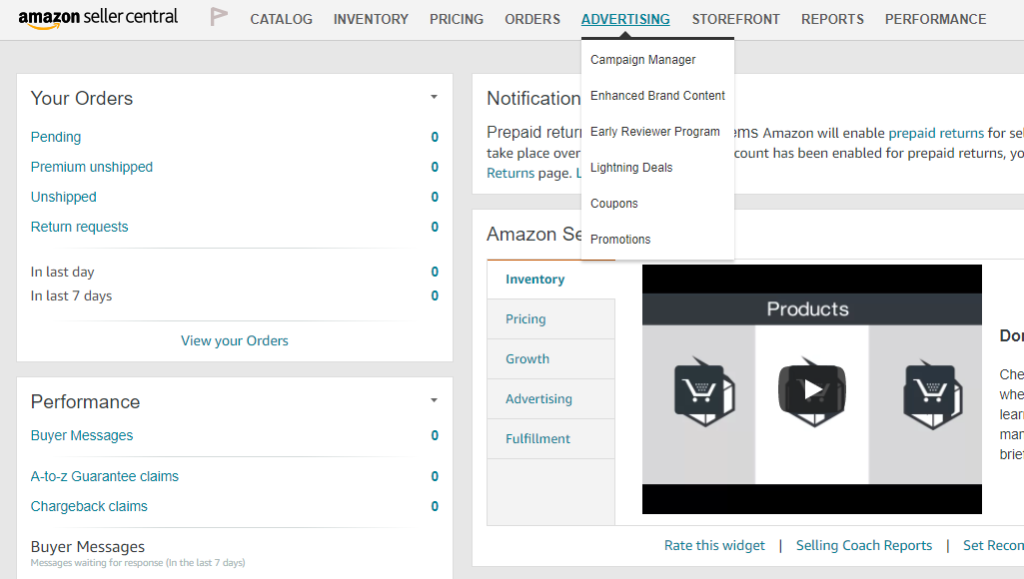
Step 1: Go to Advertising > Coupons in Seller Central

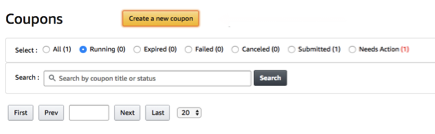
You will find the Coupons dashboard under the Advertising tab. Click “Create a new coupon.”

Step 2: Add your products

Search for the ASINs you want to include. You can add multiple products to a single coupon. Seller Central will flag any ASINs that are ineligible before you proceed. Grouping related products from the same category or range works well because it makes the coupon browsable from a single page.

Step 3: Set the discount

Choose either a percentage (5% to 80%) or a fixed dollar amount. Amazon calculates the percentage against the product’s lowest selling price in the past 30 days. You cannot set a discount that creates a price below the minimum threshold Amazon enforces for that category.

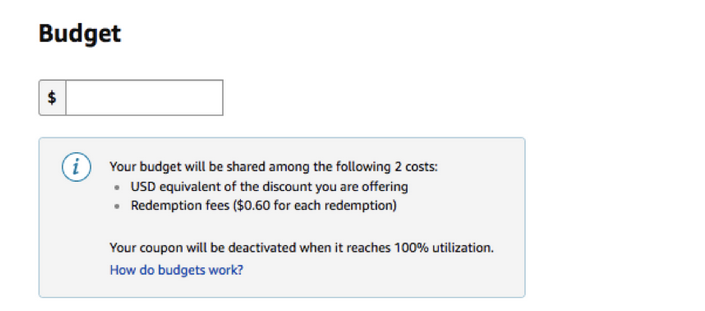
Step 4: Set your budget

Your budget covers both the flat fee and the 2.5% attribution fee. Set it to the maximum you are willing to spend on this campaign. The coupon turns off automatically when the budget is reached, so buyers stop seeing the badge without any action needed on your part.

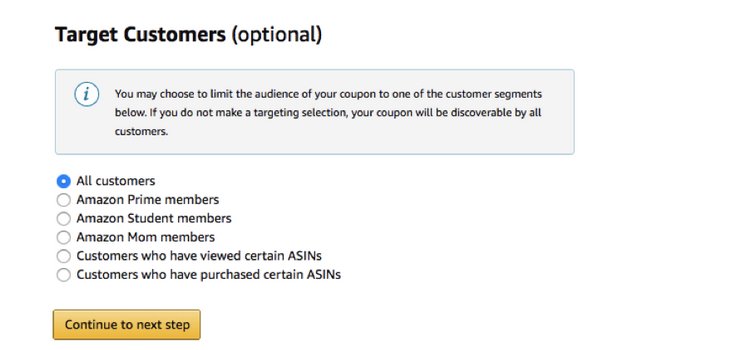
Step 5: Choose your audience

You can target all Amazon shoppers or restrict to specific groups: Prime members, customers who have previously viewed your product, customers who have purchased from you before, and other segments available in your account. Narrowing the audience reduces the pool but can improve conversion rate on the redemptions that do happen.

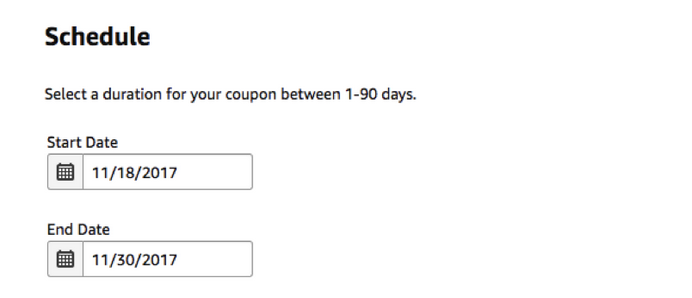
Step 6: Set the schedule

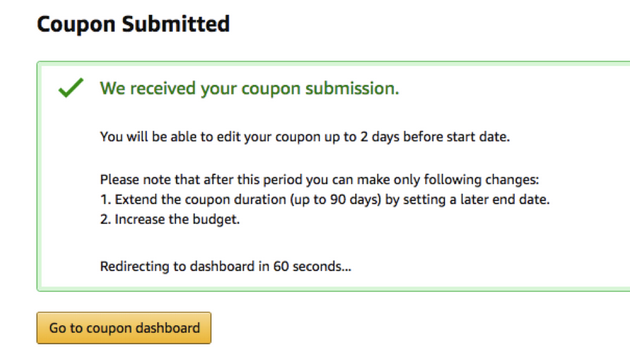
Coupons require a minimum lead time of three days from submission before they go live. You can run a coupon for up to 90 days. Set a clear end date rather than relying on the budget limit alone, especially for coupons around a specific event like Prime Day or a product launch window.

Step 7: Review and submit

Check the discount, budget, audience, and dates before submitting. Once Amazon approves the coupon (usually within 24 to 48 hours), it goes live on the schedule you set.

What Discount Should You Actually Offer?

The minimum is 5%. The maximum is 80%. The right number sits between what moves the buyer and what keeps your margin intact.

Buyers respond most to discounts that feel meaningful relative to the product price. A 5% discount on a $9.99 item saves the buyer $0.50. That is visible in the badge but unlikely to change a decision. A 15% discount on a $19.99 item saves $3, which is more compelling at the point of search.

For new product launches, a larger discount (15% to 25%) builds early review velocity and sales history faster. Check what Amazon promotions tools are available alongside coupons, including Lightning Deals and Brand Tailored Promotions, before deciding which lever fits your situation.

For slow-moving inventory, coupons paired with a slow-moving inventory strategy can shift stock without a full price reduction that affects your sales rank history.

When Do Amazon Coupons Make Sense?

Not every product should run a coupon. Three situations where they tend to pay off:

New product launches. Amazon made new listings eligible specifically for this use case. A coupon on a new ASIN boosts search visibility and incentivises the first wave of buyers who become your initial reviewers. The cost is higher per unit, but you are buying rank and social proof, not just sales.

Clearing slow-moving stock. If a product has been sitting at the same rank for an extended period, a coupon creates a conversion catalyst without permanently lowering your reference price.

Seasonal campaigns. Prime Day, Black Friday, and the Q4 peak are periods when buyers are actively seeking deals. Coupons show up in Amazon’s dedicated coupon browsing pages during these events, giving listings additional surface area beyond standard search.

How Do Amazon Coupons Affect Buy Box Eligibility?

Coupons reduce the effective purchase price for the buyer, but they do not lower the list price Amazon uses to evaluate Buy Box eligibility. Your listed price stays the same. The discount is applied at checkout after the buyer clips.

This matters because automated repricing works on your listed price. A coupon running on top of competitive pricing compounds the conversion advantage: buyers see a competitive price in the Buy Box and an additional discount available via the badge. That combination is difficult for competitors to match without cutting their own list price or running their own promotional budget.

Frequently Asked Questions

What are Amazon Seller Coupons?

Amazon Seller Coupons are discounts you create in Seller Central that appear as clippable green badges on your listings in search results and on product pages. Buyers click to clip the coupon, and the discount applies automatically at checkout. They differ from Amazon Promo Codes, which are shareable links used for social media campaigns, and from Lightning Deals, which are time-limited price reductions with a countdown timer.

How much do Amazon coupons cost in 2026?

Since June 2025, Amazon charges a $5 flat fee per coupon created plus 2.5% of the total sales attributed to that coupon. A cap of $2,000 per coupon applies to coupons created from November 5, 2025 onwards. The old $0.60-per-redemption model no longer applies to new coupons. Verify the current fee structure in Seller Central before running a campaign, as Amazon adjusts fees periodically by marketplace and account type.

Who is eligible to create Amazon coupons?

You need a Professional selling plan and an overall seller rating of at least 3.5 stars. Individual plan sellers cannot create coupons. Products must also meet eligibility criteria at the ASIN level. New products without a sales history became eligible for coupons in late 2024. Seller Central will flag ineligible ASINs when you create the coupon, so you can see which products qualify before committing your budget.

How long can an Amazon coupon run?

Coupons can run for up to 90 days from the start date. They also turn off automatically when the budget is reached, whichever comes first. A minimum lead time of three days from submission is required before a coupon can go live. Plan your start date around the event or campaign window you are targeting, not the day you create the coupon.

Do Amazon coupons affect my listing price or seller metrics?

No. Coupons reduce the price the buyer pays at checkout but do not change your listed price. Your reference price, used for Buy Box eligibility and price history calculations, remains unchanged. Coupon redemptions count as normal sales for ranking and review purposes, which is part of why coupons on new launches build sales velocity effectively.

Start your free 14-day trial of Repricer Express and keep your listed prices competitive while your coupons handle the promotional side.

Author

Want monthly repricing tips, trends and news direct to your inbox?

See our Privacy Notice for details as to how we use your personal data and about your rights